
Plant Identifier & Plant Care
Watermark Remover & Slow motion & SlowMoEducation
4.3212.00 Reviews
- Version
- 2.5.0
- Installs
- 500.00K
- Age Rating
- Everyone
Screenshots
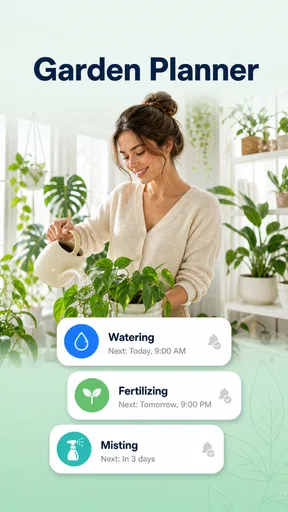
Our Review of Plant Identifier & Plant Care
 Analysis by Appyee
I tried Plant Identifier & Plant Care as someone who regularly forgets which pot needs more light, and my first impression was easy to understand: it turns a plant-care question into a quick identification task. Instead of searching through several pages of similar-looking leaves, I could start with a photo and use the result as a starting point for deciding what to check next. That makes the app appealing during the first week, especially for new plant owners or anyone who has brought home an unlabeled plant.
The app belongs to the education category and is free to install, with optional purchases ranging from around ten dollars to nearly ninety dollars per item. It is suitable for Everyone, works on Android eight or later, and is currently at version 2.5.0. The developer is listed as Watermark Remover & Slow motion & SlowMo, an unusual name for a plant-focused product, so I would personally pay attention to the app’s behavior and usefulness rather than assuming the developer name tells me much about its specialization.
What the first week feels like
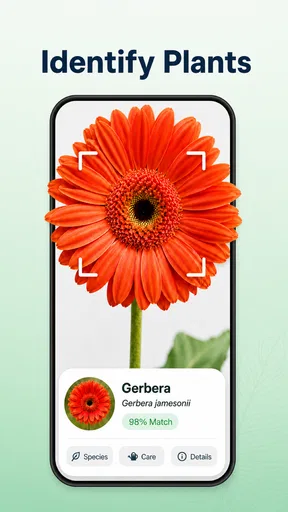
The strongest early use case is identification. I can imagine opening the app beside a windowsill, photographing a leaf, and using the result to narrow down what I am looking at. That is more practical than trying to describe the shape, color, and texture in a search box. It is also useful when buying a plant from a market or receiving a cutting from a friend and wanting a likely name before choosing a place for it.
The same workflow can help with trees and mushrooms, but those categories deserve more caution. A likely match is not the same as a professional identification, particularly when a mushroom could be eaten or when a plant may be harmful to pets. I would use the app to generate possibilities, then verify important details with a trusted botanical, veterinary, or local foraging source. Never treat an image-based suggestion as permission to eat a mushroom or handle an unfamiliar plant casually.
For ordinary houseplant questions, the educational value is in connecting a name with a care routine. Once I have a probable identity, I can think more clearly about light, watering, soil, and seasonal changes. That is a better starting point than applying the same routine to every plant. A cactus, a fern, and a tropical foliage plant may all look attractive in the same room, but their needs are not interchangeable.
One practical tip is to take the clearest photograph I can rather than rushing through the process. I would use natural light, include the whole leaf where possible, and avoid placing several plants in the same frame. A close, sharp image with a visible stem or leaf arrangement gives an identification tool more useful visual information than a dark photo taken from across the room. This is a small habit, but it can reduce the frustration of receiving a broad or uncertain result.
Another useful first-week routine is to label my own notes with the date and location of each plant. The app can help me identify what I own, but my care decisions still depend on the conditions in my home. A plant near a bright window may behave differently from the same species in a dim hallway. Recording where it sits prevents me from confusing an identification problem with a lighting problem.
The app has attracted a 4.3 average from around two thousand ratings, with more than two hundred written reviews, and it has passed half a million installs. Those figures suggest that the concept has reached a meaningful audience, but they do not remove the need for sensible expectations. Identification apps are most convincing when the plant is distinctive and the image is clear. They become less dependable when the subject is damaged, very young, flowering unusually, or photographed under poor lighting.
Where it fits beside familiar alternatives
Compared with a general web search, Plant Identifier & Plant Care is quicker for the initial step because I do not need to invent the right descriptive words. A search engine is often better afterward, especially when I want detailed information from a botanical garden, university extension service, or specialist grower. I see this app as a front door to research, not a replacement for every source behind that door.
Compared with a printed plant book, it is more convenient when I am away from home and do not know the plant’s family or common name. A book can still be better for slow comparison, learning visual differences, and checking several species side by side. The app wins on immediacy; the book often wins on context.
Compared with asking an experienced gardener, the app is available at any moment and does not require waiting for a reply. A knowledgeable person may still notice clues that a single image misses, such as a smell, sap, growth pattern, soil condition, or the plant’s history. When the stakes are high, I would combine the app’s suggestion with human or institutional confirmation.
Does it remain useful after the novelty fades?
I find it easier to judge whether a plant tool will last by asking whether it helps me make better decisions after I already know a plant’s name. Here, the useful test is whether I return when growth changes, not simply whether the first identification feels satisfying. That leads naturally to a closer look at the habits and practical barriers that shape its longer-term use.
Month-to-month value depends on changing questions
Identification has a natural limit: once I know the names of all the plants in my home, I may open the app less often. That is the main challenge for long-term value. The first few sessions can feel rewarding because every scan solves a mystery. After that, the app needs to support recurring decisions rather than only naming new discoveries.
Its care angle gives it a better chance of staying relevant. Plants change through the year, and the questions change with them. A plant that looked healthy when I bought it may begin losing leaves after a move, stretching toward a window, or reacting to a different watering pattern. In those moments, an identification and diagnosis tool can be useful again, particularly if I compare the current appearance with what I observed earlier.
I would not use the app as a substitute for observing the plant itself. A diagnosis based on a photo can point me toward possibilities, but plant problems often have overlapping symptoms. Yellow leaves may relate to watering, light, roots, age, or several issues at once. The most useful workflow is to combine the app’s suggestion with simple checks: feel the soil, inspect the underside of leaves, look for pests, check drainage, and consider whether the plant recently moved.
A non-obvious benefit is that the app can encourage better questions. Instead of asking only, “What plant is this?” I can ask, “What changed before the leaves declined?” or “Is this damage limited to older growth?” That shift turns the app from a novelty camera into part of a basic observation routine. It is especially helpful for beginners who need a framework for noticing patterns.
For a realistic everyday scenario, imagine a busy weekday evening. I notice pale leaves on a plant near the kitchen, take a photo, and use the result to confirm what kind of plant I probably have. I then compare the suggested care direction with the plant’s actual situation: the pot is still damp, the window is shaded, and the newest growth is smaller than before. The app has not solved everything, but it has helped me avoid the common mistake of adding more water simply because the plant looks unhappy.
That kind of indirect value matters more to me than repeatedly scanning healthy plants. The app earns space when it helps me pause before making a damaging change. It is less valuable if I use it only for a name and then ignore the plant’s conditions.
The maintenance burden is mostly human
Plant Identifier & Plant Care does not remove the need for a maintenance habit. I still have to photograph plants clearly, remember what advice applied to which pot, and follow up after making a change. If I expect the app to act like an automatic gardener, I am likely to be disappointed. Its role is closer to an accessible reference and diagnostic aid than a replacement for regular care.
I would build a simple routine around it rather than opening it randomly. Once a week, I might inspect the plants that recently showed symptoms, photograph meaningful changes, and write down what I altered. That creates a small feedback loop: identify, observe, change one factor, and reassess. Changing several things at once makes it impossible to know what helped.
The app is also more useful when I keep the camera process consistent. Similar lighting and angles make visual comparisons easier. I would avoid taking a picture immediately after watering if I am trying to judge wilting, because the timing can confuse the situation. Likewise, a dusty leaf can hide discoloration, while a wet leaf can create reflections that look like damage.
There is a financial maintenance question too. The app is free to start, but the presence of in-app purchases means I would check what is included before committing to any paid option. I would not pay simply because I had a frustrating identification result. First I would try a better photo and an independent source. A paid feature may be worthwhile for someone who uses the app frequently, but a casual owner with a small, already identified collection may not get enough recurring value.
The minimum operating requirement is Android eight or later, which covers many compatible devices but still matters if I am using an older phone. I would also keep enough patience for the camera-based workflow itself. A plant-identification tool is only as convenient as the moment when I need it; if taking and reviewing photos feels cumbersome, I will naturally return to a quick web search.
What can cause fatigue over time
The first source of fatigue is repetition. If every session follows the same pattern—take a picture, receive a name, close the app—the experience can lose its appeal once the collection is familiar. The care and diagnosis angle helps, but only when I use it to investigate real changes rather than scanning for entertainment.
The second is uncertainty. A plant can resemble several related varieties, and visual diagnosis is not equally strong for every symptom. If the result feels too broad, I may need to repeat the photo or consult another source. That is not a flaw unique to this app, but it affects whether I keep it installed. I value tools that make uncertainty clear rather than encouraging overconfidence.
The third is the danger of acting too quickly. A beginner may see a diagnosis and immediately repot, fertilize, prune, or move a plant. Those interventions can create extra stress. My preferred approach is conservative: identify the likely issue, make one modest change, and watch the response. If the plant is poisonous, severely diseased, or valuable, I would seek specialist advice instead of relying on an app alone.
There is also a mismatch between broad plant coverage and specialist depth. The ability to identify plants, trees, and mushrooms makes the app appealing to curious users, but someone caring for rare orchids, bonsai, carnivorous plants, or a serious edible garden may need a dedicated community or reference source. Those alternatives can offer more specialized growing context, even if they are slower than taking a photo.
I would skip this app if I wanted a fully automated schedule that handles every watering decision without observation. I would also skip relying on it for safety-critical mushroom identification or formal disease diagnosis. It makes more sense for learners, casual gardeners, plant shoppers, and households building a basic understanding of their greenery.
My long-term verdict
After the novelty fades, Plant Identifier & Plant Care can remain useful, but not because I would scan the same plants every day. Its lasting value comes from giving me a quick starting point when I acquire an unknown plant, notice a change, or need to organize my thinking before researching further. That is a narrower promise than “the app will care for my plants,” but it is a more realistic and useful one.
I like it most as a companion to careful observation. It can shorten the path from a mystery leaf to a sensible research direction, and it may prevent beginner mistakes caused by guessing. The strongest users will treat its output as guidance, keep track of conditions, and confirm important conclusions elsewhere. The weakest experience will come from expecting every photograph to produce a definitive answer.
For a free app in the education space, the low-risk entry point is attractive, especially for someone who has just started collecting plants. The optional purchases deserve a deliberate decision rather than an automatic upgrade. I would keep it installed if I regularly bring home unidentified plants or enjoy learning through diagnosis. If my collection is stable and I already have trusted references, I might use it only occasionally.
My recommendation is therefore positive but measured: try it for identification and early troubleshooting, then judge it by whether it changes your care habits. The app earns lasting space when it helps you observe before you act. If it becomes only a novelty scanner, the usual alternatives—a good search, a specialist guide, or an experienced grower—will often serve you just as well. If it becomes part of a calm routine for checking, researching, and making one careful adjustment at a time, it offers practical value beyond its first impressive photo result.
In my experience, that balance is what makes Plant Identifier & Plant Care worth trying. It is approachable, useful for everyday plant questions, and broad enough to bring back when something changes. I would recommend it to curious beginners and casual plant owners, with the clear advice to verify serious diagnoses and never make safety decisions from an image match alone.
Verdict
Strengths of Plant Identifier & Plant Care
- Identifies many common plants from a quick photo.
- Care reminders help organize watering and fertilizing tasks.
- Useful plant library includes practical care information.
- Simple interface makes it easy for beginners to navigate.
- Can help spot potential plant problems from visible symptoms.
Limitations of Plant Identifier & Plant Care
- Photo results may be inaccurate with blurry or poorly lit images.
- Some advanced identification and care tools require a subscription.
- Care advice may not suit every climate or indoor environment.
- Reminder features need regular setup to match each plant’s needs.
- The app may use significant storage for its plant database and images.
Similar Picks in This Category
View All
Duolingo: Language Lessons
Duolingo4.7

Google Classroom
Google LLC2.8

Unacademy: Learn & Crack Exams
Unacademy3.2

Bible App for Kids
Life.Church4.4

Cake - Learn English & Korean
Cake Corp.4.7

Brainly: AI Homework Helper
Brainly4.5
Frequently Asked Questions
What is Plant Identifier & Plant Care used for?
Plant Identifier & Plant Care is designed to help you recognize plants from photos and learn more about them. After taking or uploading an image, the app may suggest the plant’s name, basic information, and care recommendations. It can also help users organize plants, review watering needs, and understand general requirements such as sunlight, soil, and temperature.
How accurate is the plant identification feature?
The identification tool can be useful for common houseplants, garden plants, flowers, and trees, especially when the photo is clear and shows leaves, flowers, or other distinctive details. However, results are not guaranteed to be completely accurate. Similar species can be difficult to distinguish, so users should compare the suggested result with additional information before relying on it for medical, gardening, or safety decisions.
Does Plant Identifier & Plant Care provide reliable care advice?
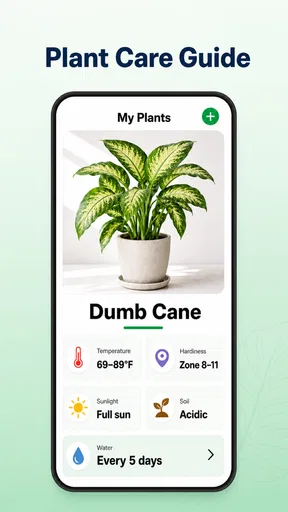
The app offers general guidance about watering, lighting, humidity, soil, and other plant-care topics. This information can be helpful for beginners, but it should be treated as a starting point rather than a professional diagnosis. Care requirements may vary according to the plant’s variety, climate, pot size, season, and indoor conditions, so users should adjust recommendations to their specific environment.
Can the app diagnose plant diseases or identify pests?
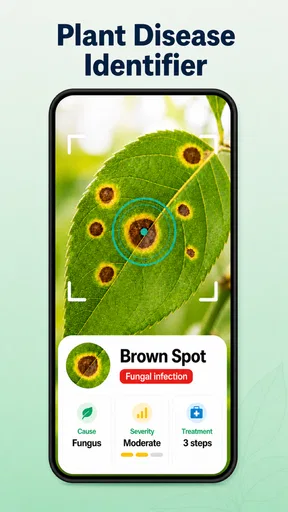
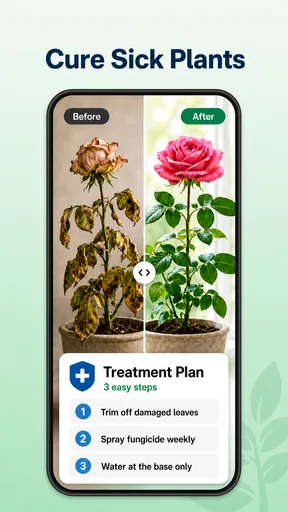
Plant Identifier & Plant Care may allow users to photograph damaged leaves or unusual symptoms and receive possible explanations, such as fungal problems, nutrient deficiencies, overwatering, or pests. These suggestions can help users investigate an issue, but they should not be considered a definitive diagnosis. If a plant is valuable, spreading rapidly, or exposed to children or pets, consult a qualified specialist before applying treatments.
Is Plant Identifier & Plant Care free to download and use?
The app may be available to download at no initial cost, while some features can depend on the version installed, the platform, or an optional premium subscription. Advanced identification, detailed care plans, unlimited scans, or advertising removal may require payment. Before confirming a trial or subscription, review the app-store listing carefully for pricing, renewal terms, and cancellation instructions.
